
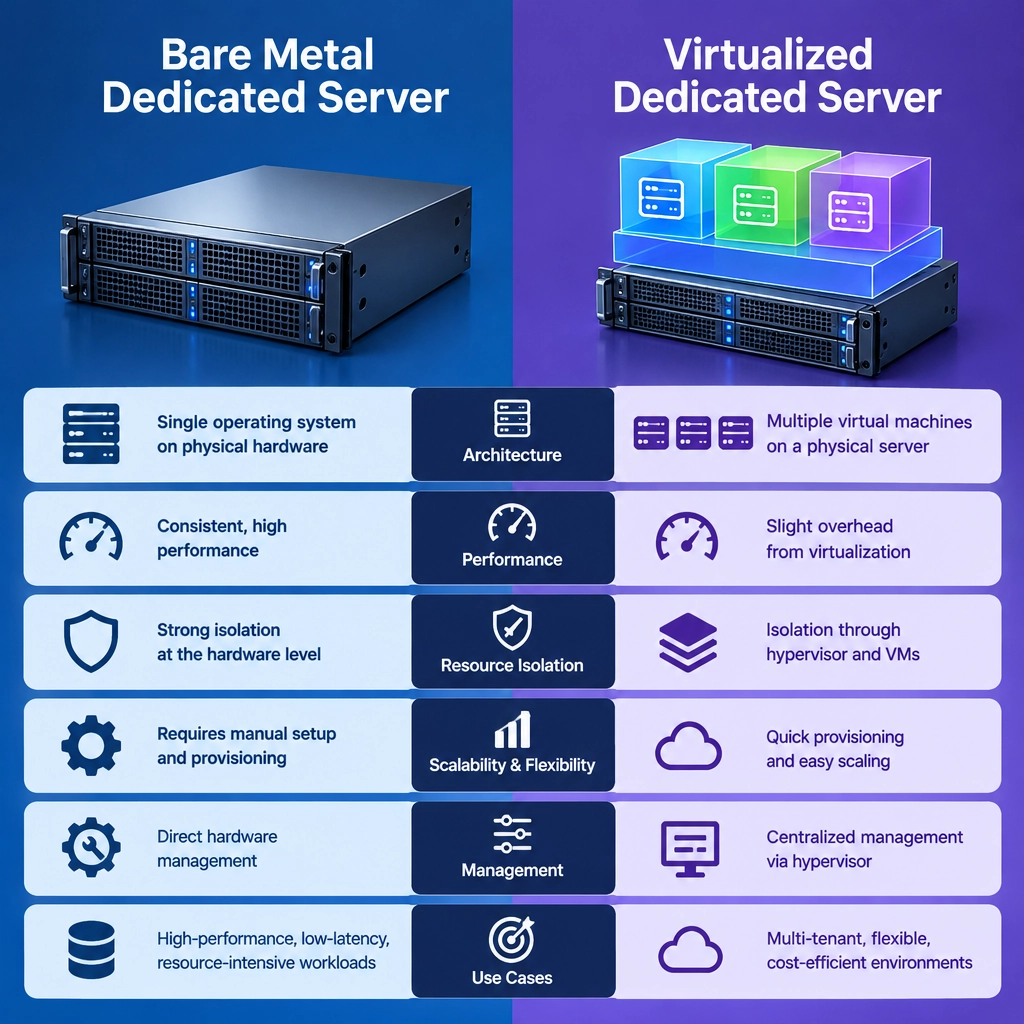
Bare Metal vs. Virtualized Dedicated Servers: Key Differences
Choosing a dedicated server isn’t always as simple as picking a processor and a storage size. You’ll also need to decide how the server’s hardware is used. Two common options are bare metal servers and virtualized dedicated servers. Both can offer strong performance and more control than typical shared hosting, but they work differently—and suit different needs.
Here’s what separates them, and how to decide which approach makes sense for your workload.
What is a bare metal server?
A bare metal server gives you direct access to a physical machine. Its processor, memory, storage, and network resources are assigned to your workload rather than divided among virtual machines.
You can install your preferred operating system and configure the server to suit your application. Because there’s no hypervisor layer between your software and the hardware, bare metal can deliver consistent, predictable performance—especially for demanding workloads.
It’s often used for large databases, high-traffic applications, game servers, and workloads that require specialized hardware or careful performance tuning.
What is a virtualized dedicated server?
A virtualized dedicated server runs on a physical host that uses a hypervisor to create virtual machines (VMs). Each VM has its own operating system and allocated resources, even though multiple VMs may run on the same physical machine.
The term “dedicated” can mean different things between providers. A VM may have dedicated or reserved CPU and memory resources, but it still relies on a shared physical host. Ask providers exactly what is guaranteed—and whether other VMs can compete for resources.
Virtualization is commonly used to run several isolated environments on one server, making it easier to deploy, manage, and scale different applications.
The key differences
Performance and consistency
Bare metal has no virtualization layer, so it can provide more direct access to the hardware. This can be valuable when an application needs maximum throughput, low latency, or reliable performance under heavy load.
Virtualization introduces some overhead, although modern hypervisors are efficient enough that it may be negligible for many workloads. Performance can also depend on how the host’s resources are allocated and managed. For typical business applications, the difference may not be noticeable; for highly tuned or resource-intensive systems, it can matter.
Isolation and control
With bare metal, your workload isn’t sharing the machine with other virtual machines. You also have broad control over the system’s configuration, which is useful when you need a particular operating system, kernel setting, or hardware setup.
A VM provides strong logical isolation from other VMs, but it still runs on a shared physical platform. That can be perfectly suitable for many uses, though organizations with strict requirements should check their provider’s security and compliance arrangements.
Flexibility and scaling
Virtual machines are relatively quick to create, resize, snapshot, and move between compatible hosts. This makes virtualization convenient for testing, hosting multiple services, and adjusting capacity as needs change.
Bare metal is less flexible in the moment. Changing hardware often involves a migration, maintenance window, or provisioning a new machine. In return, you get a stable, purpose-built environment with direct access to its resources.
Cost and resource efficiency
Virtualization can make better use of physical hardware by running multiple workloads on a single host. That efficiency can help providers offer more flexible configurations and, in some cases, lower costs.
Bare metal may cost more upfront, particularly if you need powerful, dedicated hardware. But if your application consistently uses a large share of a machine’s resources, paying for the full server can be more straightforward—and may offer better value than scaling up a collection of VMs.
Which one should you choose?
Bare metal is a strong fit when performance consistency, hardware-level control, or dedicated access is essential. It’s also worth considering for workloads that keep a server busy around the clock.
Virtualized dedicated servers are often the better choice when flexibility and rapid deployment matter more than squeezing out every bit of performance. They’re useful for hosting several separate environments, running development and test systems, or adjusting resources as a project grows.
Some organizations use both: virtual machines for everyday services, with bare metal reserved for databases or other performance-critical applications.
Before deciding, look beyond the label. Compare resource guarantees, storage and network performance, backup options, support, and scaling policies. The best server is not necessarily the one with the most hardware—it’s the one that gives your workload the right balance of performance, control, flexibility, and cost.
Welcome to DediRock, your trusted partner in high-performance hosting solutions. At DediRock, we specialize in providing dedicated servers, VPS hosting, and cloud services tailored to meet the unique needs of businesses and individuals alike. Our mission is to deliver reliable, scalable, and secure hosting solutions that empower our clients to achieve their digital goals. With a commitment to exceptional customer support, cutting-edge technology, and robust infrastructure, DediRock stands out as a leader in the hosting industry. Join us and experience the difference that dedicated service and unwavering reliability can make for your online presence. Launch our website.