
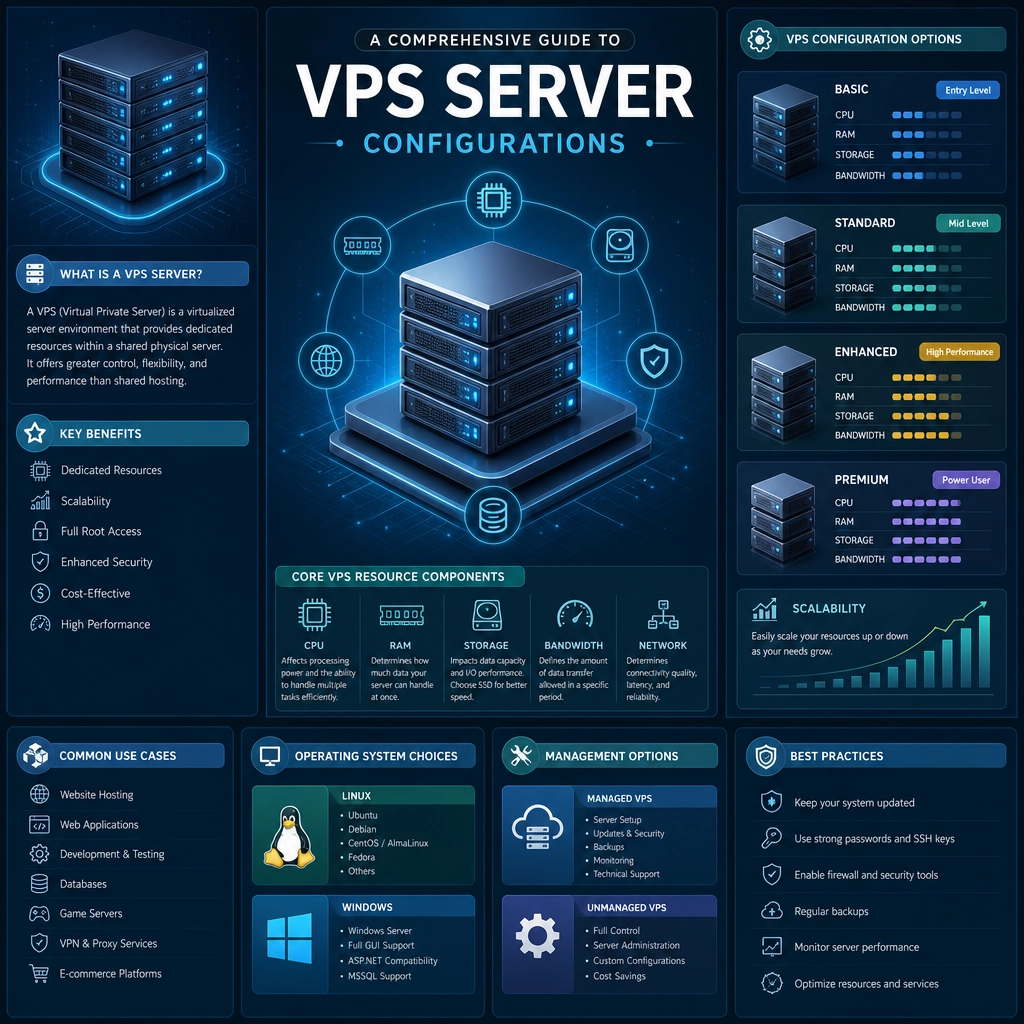
A Comprehensive Guide to VPS Server Configurations
When it comes to web hosting, the term VPS (Virtual Private Server) pops up a lot, and for good reason! It’s like the middle child of hosting options — not quite shared hosting, which is often slow and limiting, and not quite dedicated servers, which can be pricey. A VPS gives you a great balance of power, customization, and cost-effectiveness, making it an appealing choice for small to medium-sized businesses and tech enthusiasts alike.
But how do you configure a VPS to meet your specific needs? In this guide, we’ll break down the essential elements of VPS configurations, demystifying what you need to know to get your server up and running smoothly.
Understanding VPS Basics
Before diving into configurations, let’s quickly recap what a VPS is. Essentially, it’s a virtualized server that acts like a dedicated server within a larger physical server. Think of it as owning an apartment within a larger building; you have your own space, but you share some common resources with your neighbors.
Choosing the Right Operating System
One of the first things you’ll want to consider is the operating system (OS) your VPS will run. The two most popular options are:
- Linux: Often favored for its reliability and security. If you plan on using server management tools like cPanel, you’ll find that it works perfectly well with Linux distributions like CentOS, Ubuntu, or Debian.
- Windows: Ideal for those who need ASP.NET or MS SQL services. If your applications are built on the Microsoft ecosystem, this is the route to go.
Your choice of OS will significantly impact your software options and system management approach, so choose wisely based on your needs!
Resource Allocation
Resource allocation is a central aspect of any VPS setup. This includes:
- RAM: The more memory your server has, the better it can handle multiple applications. If you expect high traffic or plan to run resource-intensive applications, opt for more RAM.
- CPU Cores: The CPU is like the brain of your VPS. More cores mean better multitasking and performance, especially during peak loads.
- Disk Space: Depending on what you’re hosting, you’ll need ample storage. SSDs (Solid State Drives) are much faster than traditional HDDs, so if performance is a priority, this is worth considering.
When configuring resources, think about your current needs and future growth. It’s always a good idea to have a little extra room!
Network Configuration
Networking is often overlooked but is critical for your VPS’s performance. Key elements include:
- IP Address: Your VPS requires a unique IP address. Some hosting providers offer static IPs at no extra cost, while others might charge for them.
- Firewall: Set up a firewall to protect your server from external threats. Most VPS systems come with built-in firewall tools, but customizing them according to your needs will enhance security.
- DNS Settings: Configuring your Domain Name System (DNS) settings correctly is crucial. This helps connect your domain to your VPS, allowing users to reach your website or applications properly.
Security Configurations
Security can’t be an afterthought! Here are some essential configurations:
- Regular Updates: Keep your software and applications up to date. Many vulnerabilities arise from outdated software.
- Secure SSH Access: If you’re using SSH (Secure Shell) to access your server, make sure to disable root login and use key-based authentication instead of passwords. It’s much more secure!
- Intrusion Detection Systems (IDS): Consider setting up an IDS to monitor your network for suspicious activity. This adds a layer of protection against cyber threats.
Backup Solutions
Even with all the security measures in place, accidents happen. Regular backups ensure that you don’t lose your data and configurations. Use automated backup solutions or choose a VPS provider that includes backup services in their offerings. Backups can often save you from what could be a disastrous situation, so invest the time to set this up!
Scalability and Future Needs
Finally, it’s essential to consider future growth. As your website or application grows, so do your hosting needs. Choose a VPS provider that allows for easy scalability, so you can upgrade or add resources without too much hassle.
Wrapping It Up
Configuring a VPS server might seem daunting at first, but with the right approach and understanding of the essentials, you can create a powerful and efficient environment for your applications, websites, and more. Remember to keep performance, security, and scalability in mind as you make your selections. Before long, you’ll find that a well-configured VPS is not just a tool but a robust partner in your online endeavors!
Welcome to DediRock, your trusted partner in high-performance hosting solutions. At DediRock, we specialize in providing dedicated servers, VPS hosting, and cloud services tailored to meet the unique needs of businesses and individuals alike. Our mission is to deliver reliable, scalable, and secure hosting solutions that empower our clients to achieve their digital goals. With a commitment to exceptional customer support, cutting-edge technology, and robust infrastructure, DediRock stands out as a leader in the hosting industry. Join us and experience the difference that dedicated service and unwavering reliability can make for your online presence. Launch our website.