
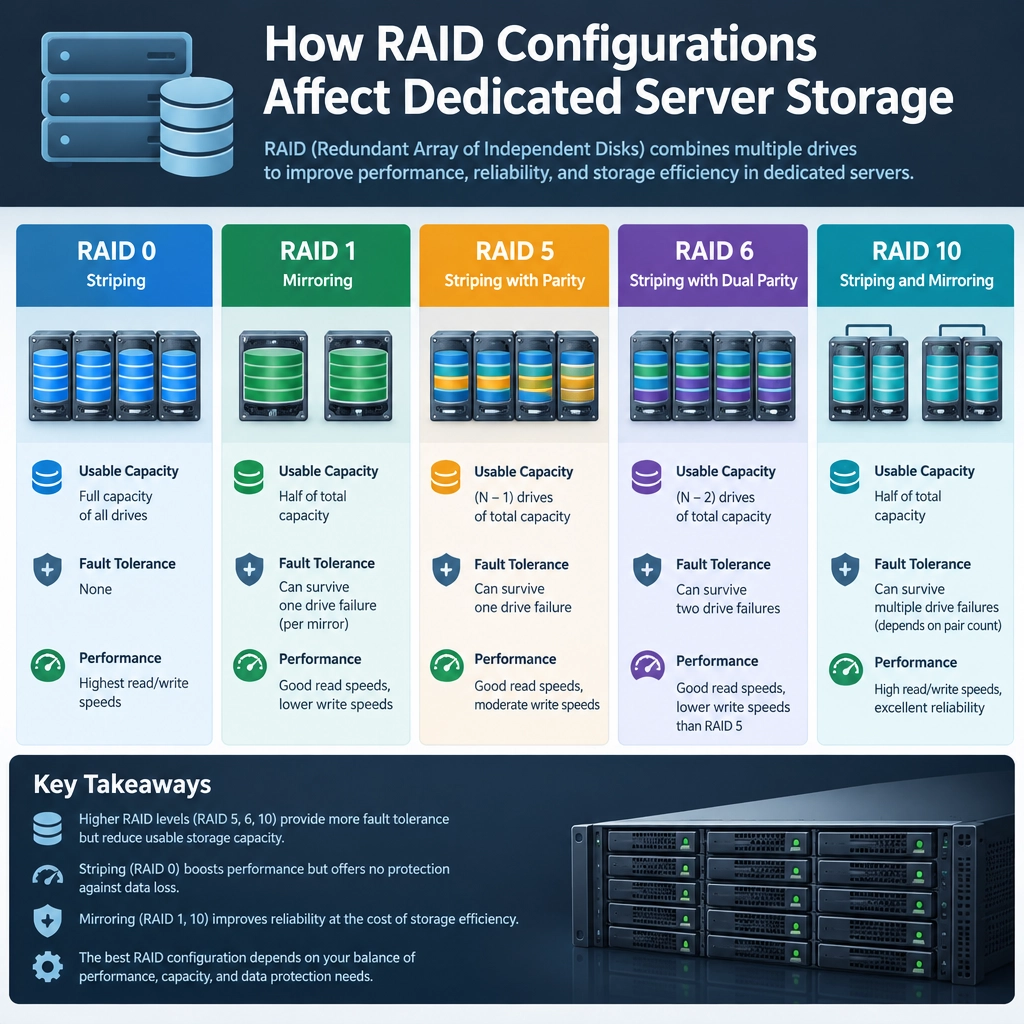
How RAID Configurations Affect Dedicated Server Storage
When you choose a dedicated server, storage isn’t just about how many gigabytes you get. The way its drives are arranged can affect performance, usable capacity, and what happens when a drive fails. That arrangement is often managed through RAID—a technology that combines multiple drives into one logical storage system.
Understanding the basics of RAID can help you choose a server that fits your workload, whether you’re hosting a website, running databases, or storing large files.
What RAID does
RAID stands for Redundant Array of Independent Disks. Depending on the configuration, it can spread data across drives for speed, keep duplicate data for protection, or do both.
A key distinction: RAID is not a backup. It can help keep a server running after certain drive failures, but it won’t protect against accidental deletion, malware, corruption, or a disaster that affects the whole server. Regular backups still matter.
Common RAID configurations
RAID 0: Speed and capacity
RAID 0 splits data across two or more drives, allowing them to work in parallel. This can improve read and write performance and makes nearly all combined drive capacity available.
The trade-off is risk: RAID 0 provides no redundancy. If one drive fails, the entire array may become unusable. It can suit temporary or easily replaceable data, but it’s a poor choice when uptime or data preservation is important.
RAID 1: Mirroring
RAID 1 writes the same data to two drives. If one fails, the other can keep the server running while you replace the failed drive and rebuild the mirror.
This is straightforward and offers useful protection, but usable capacity is roughly equal to that of a single drive. Two 2 TB drives, for example, provide about 2 TB of usable storage—not 4 TB.
RAID 5: A balance of capacity and protection
RAID 5 distributes data and parity information across at least three drives. It can tolerate one drive failure, while offering more usable capacity than mirroring. With three 2 TB drives, roughly 4 TB is available before formatting and system overhead.
RAID 5 can be a reasonable fit for general-purpose storage, but rebuilding an array after a failure can take time, especially with large drives. During that period, the system may be more vulnerable if another drive fails.
RAID 6: More protection
RAID 6 works like RAID 5 but stores enough parity to survive two drive failures. It requires at least four drives and uses more capacity for protection. That makes it attractive for larger storage pools where resilience matters more than maximizing space.
RAID 10: Speed plus mirroring
RAID 10 combines mirrored pairs with striping. It can offer strong performance and can tolerate drive failures, depending on which drives fail. At least four drives are needed, and roughly half of the raw capacity is available for data.
It’s often considered for workloads such as databases that need both fast access and fault tolerance.
RAID affects performance, not just protection
RAID can change how quickly a server reads and writes data, but the result depends on the workload, drive type, controller, and configuration. For example, striping may help with parallel operations, while parity calculations can add overhead to some writes. SSDs also behave differently from traditional hard drives, so a configuration that makes sense for one may not be ideal for the other.
It’s worth looking beyond headline figures. A server advertised with several drives may have less usable capacity once RAID is configured, and performance claims may not reflect your specific application.
Choosing the right setup
Start with your priorities. If your data is easy to recreate, you may value capacity or speed. If downtime is costly, redundancy is more important. For database-heavy applications, performance and recovery time may both deserve close attention.
Also ask how drive replacement and array rebuilding are handled, whether hot-swappable drives are available, and what backup options are included. A protected array can reduce the impact of a drive failure, but it doesn’t remove the need to plan for recovery.
The best RAID configuration is the one that matches your workload and risk tolerance—not simply the one with the most drives or the biggest capacity number. With a clear understanding of the trade-offs, you can choose dedicated server storage that supports your applications today and gives you a sensible path forward when something goes wrong.
Welcome to DediRock, your trusted partner in high-performance hosting solutions. At DediRock, we specialize in providing dedicated servers, VPS hosting, and cloud services tailored to meet the unique needs of businesses and individuals alike. Our mission is to deliver reliable, scalable, and secure hosting solutions that empower our clients to achieve their digital goals. With a commitment to exceptional customer support, cutting-edge technology, and robust infrastructure, DediRock stands out as a leader in the hosting industry. Join us and experience the difference that dedicated service and unwavering reliability can make for your online presence. Launch our website.