
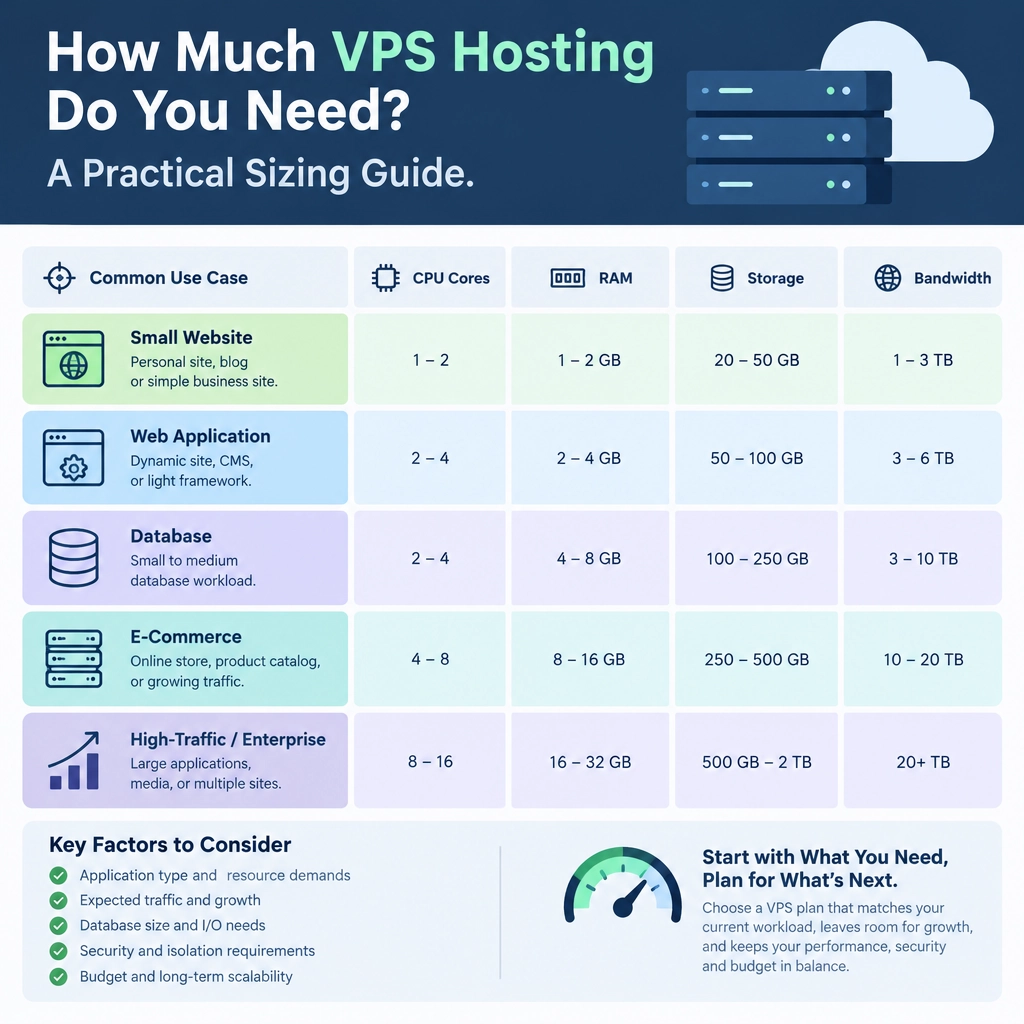
How Much VPS Hosting Do You Need? A Practical Sizing Guide
Choosing a VPS can feel like shopping for a bigger engine: you want enough power for the road ahead, but you don’t want to pay for capacity you’ll never use. The right size depends less on your website’s label—“blog,” “store,” or “app”—and more on what it does, how many people use it, and how efficiently it’s built.
Here’s a practical way to estimate what you need.
Start with what your server will run
A simple site serving mostly static pages has very different needs from an online store running a database, search, and background jobs. Make a quick list of what your VPS will host:
- Operating system and control panel
- Web server, such as Nginx or Apache
- Application runtime, such as PHP, Node.js, or Python
- Database, such as MySQL or PostgreSQL
- Caching, email, monitoring, or other services
Each component consumes memory and processor time. Hosting a database and application on one VPS is convenient, but it means they share the same resources. If you plan to run several sites, consider their combined workload—not just the needs of your largest one.
Understand the main resources
RAM: often the first limit
Memory is usually the most important place to start. If a server runs out of RAM, it may slow down, terminate processes, or rely on swap space, which is much slower.
As a rough starting point:
- 1 GB RAM: A lightweight personal site or small test environment
- 2 GB RAM: A basic business site, small blog, or modest app
- 4 GB RAM: A growing site, small store, or several lighter websites
- 8 GB or more: Heavier applications, busy stores, larger databases, or multiple services
These are guidelines, not guarantees. A lean static site can run comfortably on little memory, while a plugin-heavy content management system may need more even with moderate traffic. Leave headroom for traffic spikes and routine tasks such as backups or updates.
CPU: useful for bursts and busy moments
CPU cores matter when your site has to do work—processing requests, generating pages, running scripts, or handling simultaneous visitors. A static site usually needs little CPU. Dynamic sites and applications can need more, especially if they perform complex searches, image processing, or frequent database queries.
For many small sites, one or two virtual CPU cores are a reasonable starting point. Consider more if you expect steady concurrent activity or have tasks that run in the background. More cores won’t automatically make a site faster, though: poorly optimized code or slow database queries can remain bottlenecks.
Storage: account for more than your website files
Check both the amount of storage and the type of disk. SSD or NVMe storage can improve response times, particularly for database-heavy workloads.
Estimate space for:
- Application files and databases
- Uploaded images, videos, and documents
- Logs, temporary files, and software packages
- Backups, if they’re stored on the VPS
Keeping backups on the same server is convenient but risky: a server failure could take both your site and its backup with it. External or provider-managed backups are usually a safer choice.
Bandwidth: estimate traffic and page size
VPS plans may include a monthly transfer allowance or charge for usage above it. A rough estimate is:
Monthly bandwidth ≈ monthly visits × average pages per visit × average page size
For example, 20,000 monthly visits, with two pages viewed per visit and pages averaging 1.5 MB, use around 60 GB before accounting for bots, downloads, caching, and other traffic. Image-heavy pages and file downloads can raise that figure quickly. A CDN can reduce the amount of content your VPS needs to deliver directly.
Choose a starting size, then measure
If you’re launching a small site or app and don’t have reliable traffic data yet, start with a modest plan—often 2 GB RAM and 1–2 vCPUs for a basic setup. A simple personal project may need less; a store or resource-intensive app may need more. Check the host’s upgrade process before committing, especially if resizing requires downtime or migration.
After launch, use monitoring rather than guesswork. Watch memory usage, CPU load, disk space, and response times during normal activity and busy periods. A server that sits near its limits all day may need an upgrade; one that stays mostly idle may be oversized. Also investigate whether caching, image optimization, or database tuning can solve the problem before adding resources.
Don’t size for a fantasy traffic spike
Planning for growth is sensible, but buying a huge VPS “just in case” often wastes money. Start with a sensible buffer, keep an eye on real usage, and choose a provider that makes scaling straightforward. The best VPS size is not the biggest one—it’s the smallest plan that comfortably handles your actual workload, with enough room to grow when the numbers show you need it.
Welcome to DediRock, your trusted partner in high-performance hosting solutions. At DediRock, we specialize in providing dedicated servers, VPS hosting, and cloud services tailored to meet the unique needs of businesses and individuals alike. Our mission is to deliver reliable, scalable, and secure hosting solutions that empower our clients to achieve their digital goals. With a commitment to exceptional customer support, cutting-edge technology, and robust infrastructure, DediRock stands out as a leader in the hosting industry. Join us and experience the difference that dedicated service and unwavering reliability can make for your online presence. Launch our website.