
Decoding RAID Configurations for Your Storage VPS
When you’re choosing a storage VPS, it’s easy to focus on the headline numbers: disk size, memory, and monthly price. But there’s another detail that can make a big difference to how your data behaves: the RAID configuration.
RAID combines multiple drives to improve performance, protect against certain disk failures, or both. The name sounds technical, but understanding the most common options can help you choose a VPS that better fits your workload—and avoid assuming that “redundant” means “fully backed up.”
What RAID does
RAID stands for Redundant Array of Independent Disks. Depending on the setup, data may be split across drives for speed, duplicated for resilience, or spread out with recovery information so a server can keep running after a drive fails.
On a VPS, RAID is usually managed by the hosting provider on the physical server beneath your virtual machine. That means you may not control the RAID layout directly, but it’s still worth asking how the provider protects its storage.
The key trade-off is straightforward: some RAID configurations prioritize usable capacity, some prioritize fault tolerance, and some aim to balance the two.
RAID 0: speed and capacity, without protection
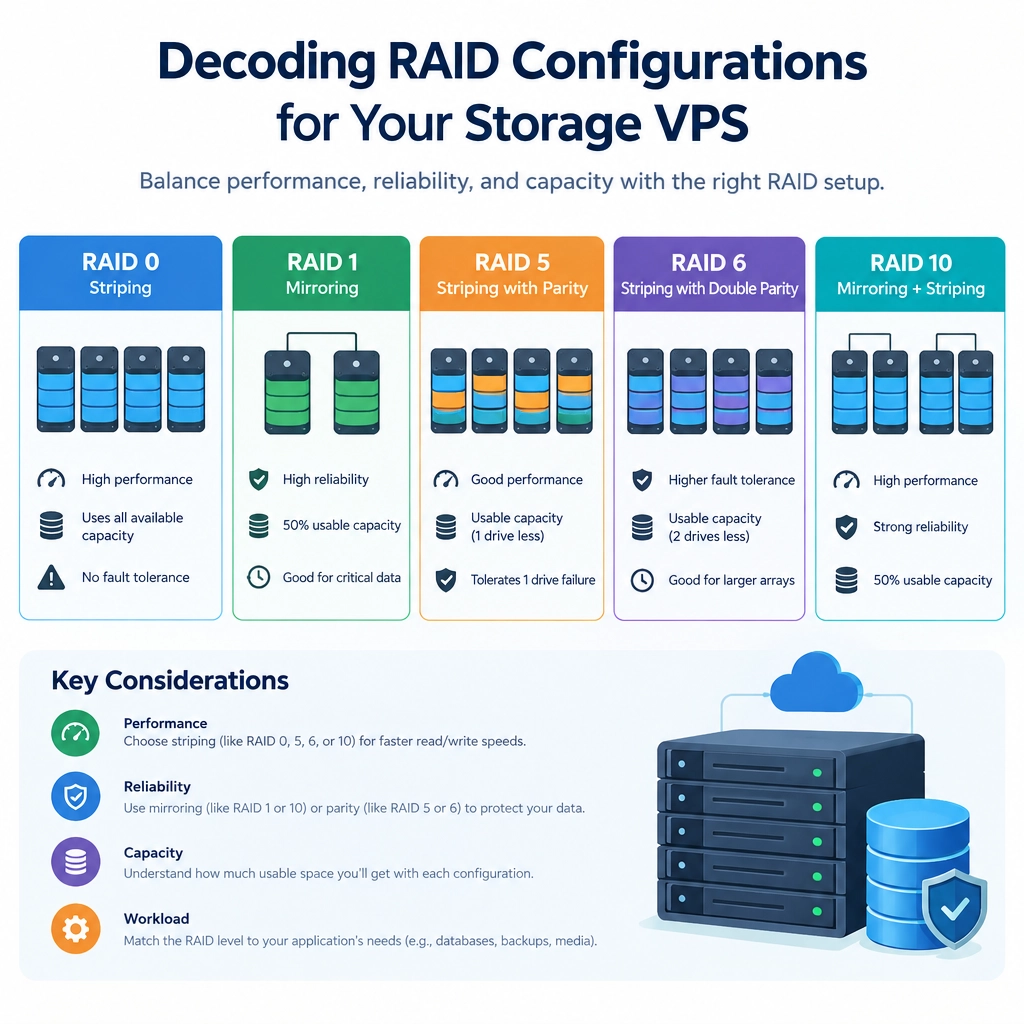
RAID 0 spreads data across two or more drives. Because the drives work together, it can offer high performance and make the combined capacity available.
The catch is that RAID 0 provides no redundancy. If any drive in the array fails, the data across the array may be lost. That makes it a poor choice for important files unless you have a separate, reliable backup plan.
For a storage VPS, RAID 0 may suit temporary data or workloads where speed matters and the data can be recreated. It’s rarely the right place to keep your only copy of valuable information.
RAID 1: a straightforward mirror
RAID 1 writes the same data to two drives. If one drive fails, the other can continue serving the data, making this a simple and familiar option for resilience.
The trade-off is capacity: two drives generally provide the usable space of one. RAID 1 can be a sensible choice when protecting against a single drive failure matters more than maximizing storage, though it doesn’t guard against every kind of data loss.
RAID 5: a balance of capacity and protection
RAID 5 stripes data across at least three drives and distributes parity information among them. Parity is used to rebuild data if one drive fails.
Compared with mirroring, RAID 5 typically offers more usable capacity. It can also keep operating after a single drive failure, though performance may be affected during recovery. Rebuilding a large array can take time, and a second drive failure before the rebuild finishes can be disastrous.
RAID 5 may be appropriate for general-purpose storage, but the provider’s hardware, workload, and recovery process all matter.
RAID 6 and RAID 10: more protection or more performance
RAID 6 is similar to RAID 5 but stores enough parity to tolerate two drive failures at once. It can be a useful option for larger arrays where rebuilds take longer and extra fault tolerance is valuable. The cost is reduced usable capacity and potentially slower writes.
RAID 10 combines mirroring and striping. It usually requires at least four drives and offers strong performance alongside redundancy. Since data is mirrored, usable capacity is typically about half of the total raw capacity. RAID 10 can handle some multiple-drive failures, depending on which drives fail, but it is not automatically safe from every combination.
RAID is not a backup
This is the most important point: RAID helps a system stay available when a drive fails. It does not protect against accidental deletion, ransomware, application bugs, account compromise, or a serious hosting incident.
Keep independent backups, ideally in a separate location, and periodically test that you can restore them. A redundant server with no usable backup is still a risky place to store anything important.
What to ask your VPS provider
Before choosing a plan, ask what RAID level is used, whether the storage is local or network-based, and what happens if a physical disk fails. It’s also worth checking whether snapshots or backups are included, how often they run, and how long they’re retained.
The best RAID setup depends on what you’re storing and how quickly you need to recover. Once you understand the trade-offs, those storage specifications become less of a mystery—and it’s easier to build a VPS setup that balances capacity, speed, and resilience without mistaking redundancy for a complete safety net.
Welcome to DediRock, your trusted partner in high-performance hosting solutions. At DediRock, we specialize in providing dedicated servers, VPS hosting, and cloud services tailored to meet the unique needs of businesses and individuals alike. Our mission is to deliver reliable, scalable, and secure hosting solutions that empower our clients to achieve their digital goals. With a commitment to exceptional customer support, cutting-edge technology, and robust infrastructure, DediRock stands out as a leader in the hosting industry. Join us and experience the difference that dedicated service and unwavering reliability can make for your online presence. Launch our website.